
TLDR; API Challenges can now be used without installing any REST Clients.
A few things that changed for the API Challenges recently.
- new repo
- In Situ Requests for the Simulator
- Swagger UI
My aim with the API Challenges was always to make API Testing easy to learn and experiment with. Hopefully all of this makes the API Challenges easier to use and work through.
API Challenges Repo
API Challenges was a ‘spin off’ project from my ‘Thingifier’ Entity Relationship Modelling tool.
I’ve now moved the API Challenges into a Repo of their own.
New releases will be on the API challenges repo:
- New API Challenges releases
- Old API Challenges releases still on the Thingifier
This allows me to expand the features of the Thingifier without always updating the API Challenges.
New Simulation Mode Features
The API Simulator is a set of requests with canned responses.
It is a ‘real’ API, in that it will respond with XML or JSON if you change the accept headers - but I don’t really advertise that because it is designed to be easy to use… but it’s a real API.
We’ve had an Open API spec file that you can upload into Swagger or REST Clients for a while. And that was basically the main suggested way to work with the API.
But I wanted to make working through the Simulator even easier.
So I’ve added in-situ request execution.
When you work through the Simulator instructions, which are step by step instructions, and you encounter a request that the simulator wants you to make. You can now make it directly from within the browser and see the results.
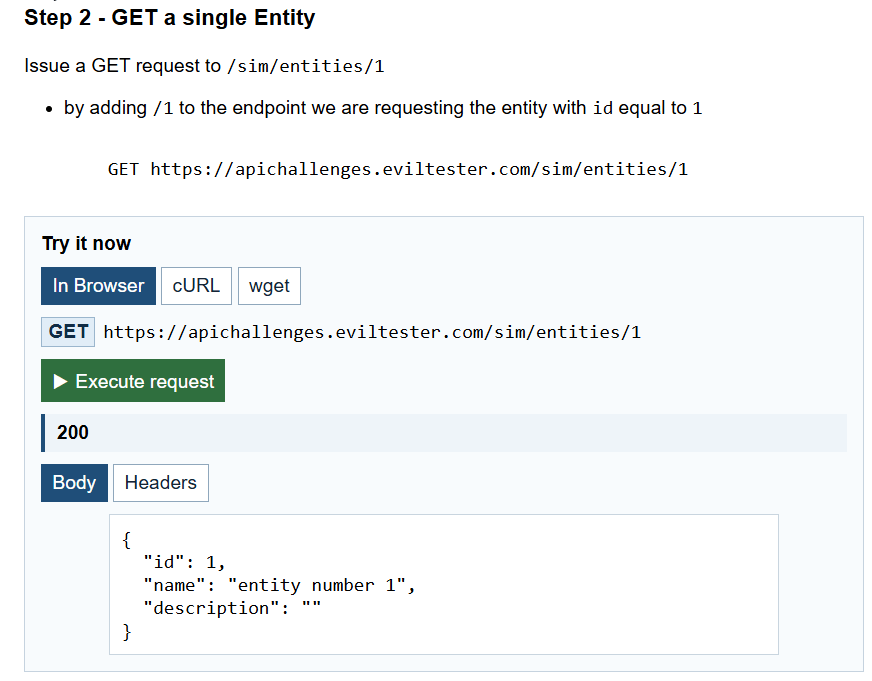
If you want to experiment with cURL or wget to make the requests then you can copy them from the page and paste them into your CLI.
This should make it a lot easier for first time walkthroughs of “what is an API?” and “What are API requests exactly?”
And… we’ve added a Swagger UI page so you can use the swagger UI to experiment. But more on that in a moment.

Swagger UI
We now have a Swagger UI page for all of the main APIs on the site.
- Simulator
- [Simple API]https://apichallenges.com/simpleapi/docs/swagger-ui)
- API Challenges
This means that you can use all the APIs without having to install a REST client and experiment with the API.
I do recommend using an API Client because it is the only way to really solve all the challenges and you will use a REST Client when you test APIs in the real world.
But… the Swagger UI is another ’easy next step’. Rather than forcing you to use a client you can start making requests in the browser and when you understand what you are doing you can move on to a REST Client.

Recommended Learning Steps for API Testing
Depending on where you are in your API Testing journey, you can start at different points in this list:
- Walkthrough the instruction steps in the Simulator using the in browser request widget. Make request and see responses.
- Learn more about APIs using the Learning Zone which has tutorials and reference information.
- Experiment with the Simple API using the Swagger UI
- Download one of the REST API Clients - you can find a list on the site
- Experiment with your client using the Mirror mode to make sure the client is setup correctly.
- Work through the API Challenges using the REST Client
Mix and match the Simulator if you want to experiment with different clients or start using CLI tools like cURL or wget.
Hopefully there is enough flexibility in learning style and information that you can learn and experiment with APIs at your own pace.
And if you want additional variety and more sites to test then we have a list of recommended Practice APIs